Unlock the potential of Copilot for Microsoft 365
Why use Copilot for Microsoft 365?
Boost the everyday productivity of your team
Thanks to Copilot, you can automate repetitive tasks and focus on what really matters. You can ask Copilot to summarise your inbox, draft a report or help build a presentation.
Seamless integration with Microsoft 365
Copilot works inside the tools your colleagues already know: including Outlook, Teams, Word, Excel, PowerPoint and SharePoint.
Your data stays in your environment
Copilot draws insights from your own Microsoft 365 tenant. Your data remains safe within your organization.
Why choose Sirus?
To get real value from Copilot, you need more than just licenses. You need the right data structure, a secure architecture and solid adoption plan. That’s where Sirus comes in.
Architecture first
Good AI needs good data. We help you build a clear, high-quality data structure with a solid architecture you can build on. We make sure Copilot knows where to look, and where not to.
Secure and compliant by design
Migrating from fileshares or other cloud platforms? We help you move to SharePoint in a secure and structured way. Access rights are set up correctly from the start, so sensitive data stays where it belongs.
Adoption that sticks
Together, we design a step-by-step approach tailored to your organization. From pilot to full rollout, supported by the right training options (train the trainer and/or live/Teams trainings). Because Copilot is only impactful when people know how to use it.
What can we do for your organization?
- Build a high-quality data structure with a solid, thoughtful architectural foundation;
- Prepare your Microsoft 365 tenant for Copilot (implementing security and compliancy standards);
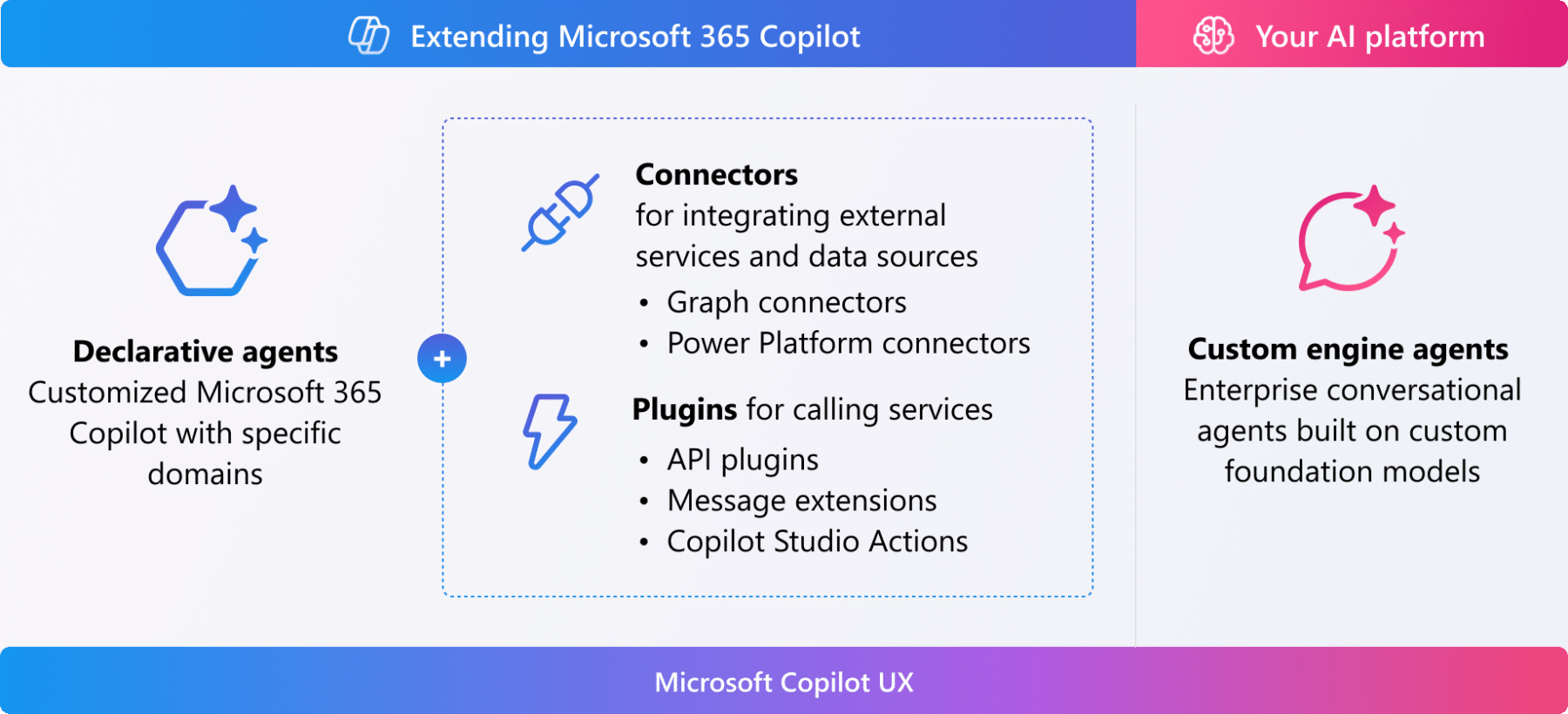
- Extend Copilot with Agents (targeted domains), Connectors (external data), and Plugins (live data access);
- Guide you through a successful pilot project and full company rollout;
- Deliver hands-on training and adoption programs tailored to your teams;
- Provide feedback and supplementary training when necessary;

Copilot in the Microsoft 365 ecosystem
- Teams – Meeting summaries, follow-up actions, live Q&A;
- Outlook – Email writing, summarising conversations, smart suggestions;
- Word – Drafts, reports, meeting notes;
- Excel – Data insights, formulas, visualisations;
- PowerPoint – Slide creation based on your input;
- SharePoint – Extend Copilot with domain-specific agents that answer targeted questions based on structured SharePoint content;
Ready to make your workday smarter with Copilot for Microsoft 365?
Sirus helps you unlock the full power of Copilot with a rock-solid architecture, expert guidance and a lasting adoption.
Frequently asked questions
What is Copilot in Microsoft 365?
Copilot is a context-aware AI assistant built into Microsoft 365 apps – like Word, Excel, Teams and Outlook – that helps users write, summarise, automate, and brainstorm using your organization’s own data.
At Sirus, we guide companies in setting up Copilot so it works securely and effectively within their Microsoft 365 environment.
How can Copilot improve the productivity in my organization?
Copilot reduces repetitive manual tasks, helps generate drafts or summaries, assists in data analysis and reporting, and accelerates content creation, freeing users to focus on higher-value work.
What kinds of tasks can Copilot perform in Microsoft 365?
Tasks may include drafting emails or documents, generating meeting summaries, creating charts or analyses in Excel, automating workflow suggestions, or summarising long threads of messages or documents.
Is Copilot secure and compliant with data protection standards (e.g. GDPR)?
Yes, Copilot operates within your Microsoft tenant and follows the permissions and access rules you already have in place.
Sirus ensures your Microsoft 365 environment is structured and secure before activating Copilot, so sensitive data stays protected and governance remains intact.
What does an organization need to prepare to adopt Copilot?
Preparation is key: data must be well-structured, permissions properly set, and governance clearly defined.
Sirus performs readiness scans to help organisations understand whether their environment is Copilot-ready and what adjustments are needed first. We help you with setting up your data architecture.
How is Copilot different from generic AI tools like ChatGPT?
Generic models use public data and lack tenant-level awareness.
Copilot in Microsoft 365 works with your own documents, files, teams and organizational data, bringing context, confidentiality and continuity. Sirus helps companies use that context safely and effectively.
Can Copilot integrate with Power Platform or other Microsoft tools?
Yes. Copilot complements Power Apps, Power Automate, and Power BI by combining automation, data insights, and natural-language assistance.
Sirus designs environments where these tools reinforce each other to create smarter workflows.
What are common challenges when rolling out Copilot?
Typical challenges include user adoption, unclear expectations, and unstructured data.
Sirus addresses these by introducing Copilot gradually, training users, and setting up governance so AI becomes a trusted part of daily work.
How can I evaluate whether Copilot is right for my use cases?
Start with pilot projects in well-defined areas, e.g. drafting, summarising, or report generation.
Monitor results, gather user feedback, and iterate before scaling. This way, you learn and adapt without risk.
What support is available for organizations looking to adopt Copilot in Microsoft 365?
Support can include environment readiness assessments, governance frameworks, integration planning, and training for end users and admins.
Sirus offers all these services as part of a long-term strategy to embed Copilot responsibly and make the most of its potential.