Power Platform
Looking for a low-code platform?
Microsoft Power Platform is an easy to use low-code platform. It consists of Power BI, Power Apps, Power Pages, Power Automate and Copilot Studio. Users can easily gain more insights about their data and build solutions for their business challenges.
Power Platform is designed to empower organizations to create custom solutions for their business. The platform integrates low-code solutions with Microsoft cloud services like Azure and Microsoft 365 and other third-party services, but also with on-premises data using custom connectors.
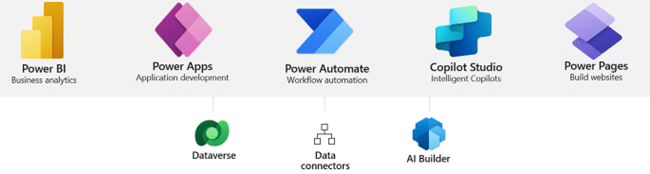
What's included?
Power BI
Make informed and confident business decisions using dashboards
Power BI is a data visualization tool. Users can create dashboards to gather insights into the diverse data streams of their company.
Power Apps
Turn ideas into solutions by building custom apps
With Power Apps, everyone in your organization can rapidly build and share low-code apps. It has a user-friendly interface with prebuilt templates and drag-and-drop simplicities.
Power Pages
Quickly build low-code business websites
Power Pages allows you to quickly build external business websites. Everyone in your organization can design websites where no coding is required.
Power Automate
Giving everyone the ability to automate organizational processes
In Power Automate it is easy to create automation flows from repetitive tasks with pre-built connectors, templates and AI assistance. Processes, individual tasks, even entire workflows, can be streamlined with no-code automation.
Copilot Studio
Easily build chatbots to engage conversationally with your customers
Intelligent bots can be built within minutes to increase the response time to the customer. The bots can use Power Automate to complete actions.
Advantages of using Microsoft Power Platform?
- Low code/ No code required: making it easy for everyone within an organization to use it;
- Customizable: tailored solutions for every organization;
- Scalable: it accommodates your data volume;
- Integration with Microsoft cloud services, third-party services and on-premises data. A list of possible connectors is available here: Connector reference overview | Microsoft Learn
Why choose Sirus for your Power Platform challenges?
Convinced to work with us for your Power Platform project?
Holistic perspective
Getting your licensing together
Hybrid integration with on-premises environments
Convinced to work with us for your Power Platform project?
Some references


Frequently asked questions
What can Power Platform bring to an organization?
Power Platform lets you automate workflows, build custom apps, and turn data into insight — without needing full-scale software development.
Sirus uses it to help organizations streamline processes and connect data sources so that business users can work more efficiently with low-code tools.
When should you use Power Platform instead of traditional development?
Power Platform is ideal when you want to validate ideas quickly, automate repetitive tasks, or enable citizen development within teams.
For complex or highly specialised systems, Sirus can combine Power Platform with .NET development to get the best of both speed and scalability.
How does Power Platform fit within a broader Microsoft environment?
Power Platform connects seamlessly with Microsoft 365, Dynamics, and Azure.
Sirus designs integrated environments where Power Apps, Power Automate, and Power BI draw data directly from SharePoint or business systems, ensuring a consistent, governed flow of information.
How do you ensure governance in Power Platform?
Low-code tools can grow fast, so governance is key.
Sirus sets up environments, roles, and data policies to ensure that every app or flow meets security, compliance, and lifecycle standards while keeping the platform manageable for IT.
What’s a good way to start with Power Platform?
Start small: identify one process to automate or one app to replace a manual workflow.
Sirus often helps clients build a proof of concept to validate the impact before scaling to a full platform strategy.