

In short
Maarten De Bont, M365 developer at Sirus, shares his notes from day one of Techorama 2026. The interesting work in AI has moved away from the model itself toward everything around it: context, tools, boundaries and review. Agents are loops, not magic, and the developer role keeps shifting toward planning, orchestration and review.

Day one of Techorama 2026 gave me a clear view of how developers and architects are using AI today.
Most sessions I attended touched AI in some form: agents, coding assistants, Power Platform, hallucination detection, MCP, function calling and enterprise integration.
The pattern I kept seeing was this: the work is moving away from the model itself and toward everything around it. Planning. Context. Tooling. Validation. Testing. Review.
That makes the developer role more interesting, not smaller.
AI has useful cases, once you look past the hype
Richard Campbell opened the day with a broad look at the current AI wave.
There is still a lot of hype. Datacenters are being built at huge scale. Infrastructure is under pressure. A lot of market value is flowing toward companies like NVIDIA.
The session also covered AlphaFold, which remains one of the clearest cases where AI delivered results outside the usual software-demo bubble.
That set the tone for the day. AI is worth taking seriously, but not blindly. The useful question is where it helps, where it fails, and what we need to put around it.
The model alone is not enough
Several sessions came back to the same point: a good model does not automatically create a good system.
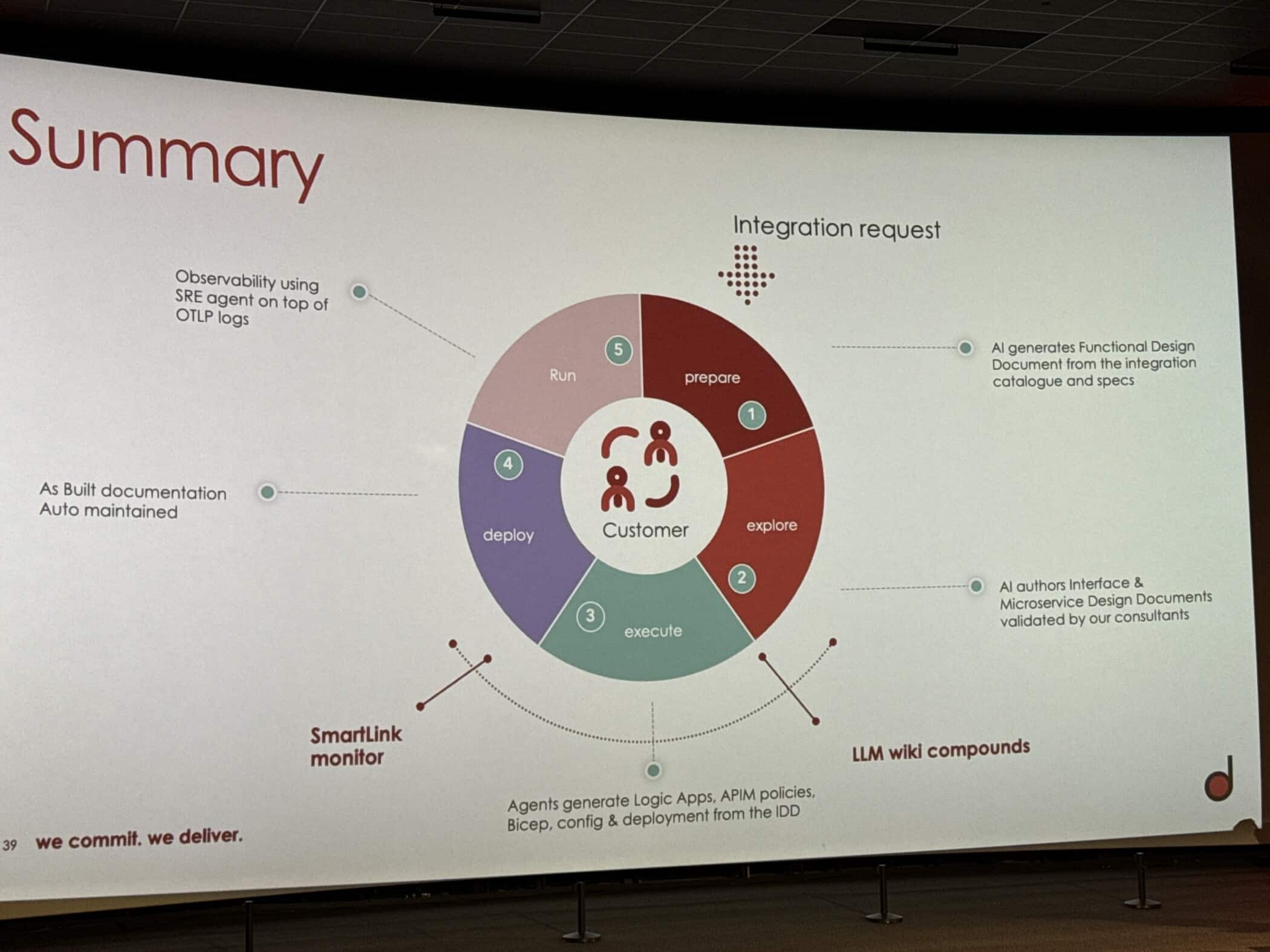
Rob Hofman’s session on AI agents for Azure integrations showed this well. The value came from specialised agents, clear prompts, project context, Git-based knowledge and integrations with tools like Azure DevOps.
That is much closer to real delivery work than the usual “one assistant does everything” story.
The model needs context. It needs tools. It needs boundaries. It needs review. Without that, you are mostly hoping the answer looks right.
Hallucinations need failure handling
Hampton Paulk’s session on hallucinations in production was one of the most grounded talks of the day.
The message was direct: hallucinations are still there.
Grounding, RAG, self-consistency, LLM-as-a-judge and guardrails can reduce the risk, but none of them remove it. One point stayed with me: consistency does not mean correctness. A strong model can repeat the same wrong answer with confidence.
That changes how we build these systems. We need to know how the system can fail, how we detect that failure, and what happens after that.
This is normal engineering work, applied to a component that does not behave like traditional code.
Coding agents shift work toward planning and review
The developer sessions showed a clear shift in how coding agents are used.
Geert van der Cruijsen’s session on OpenCode and OpenSpec focused on keeping intent in the repository instead of leaving it in a temporary chat session.
Xavier Decuyper’s Cursor session showed a similar way of working: PRDs, smaller user stories, scoped tasks, a tuned harness and commit-by-commit review.
That does not remove software engineering. It moves more of the work to the start and the end of the process.
The developer defines the intent, breaks down the work, checks the assumptions and reviews the result. The agent can speed up the execution, but the developer still needs to understand the application, the framework and the trade-offs.
Without that, you may get a prototype. Production-ready work still needs engineering judgement.
Agents are loops, not genies
Alan Smith’s session on function calling, MCP and tool use stripped away a lot of mystery around agents.
An agent is a loop. The model receives a request and sees the available tools. It returns a structured tool call. The application executes that tool and sends the result back to the model. The loop continues until there is an answer or an action.
That explains why tool design matters. Names, descriptions, parameters, schemas and boundaries all affect how well an agent behaves.
It also explains why agents can help a lot and still fail in strange ways. They work best when the task is small, the context is clear and the result is reviewed.
Power Platform AI is getting very concrete
Christina Wheeler’s Power Automate session showed a real enterprise use case: document processing.
The setup was familiar: email intake, SharePoint document storage, Power Automate orchestration, GPT-based extraction, Dataverse storage and a model-driven Power App for review.
The extraction step is where the change happens.
Instead of training a model per document type or relying on OCR, regex and custom parsers, GPT prompts can extract structured data from messy PDFs, images and semi-structured documents.
The pattern was simple: use a prompt instead of a trained model, and use a schema instead of a parser.
The prompt still needs structure. Role. Task. Schema. Rules. Examples. Output as valid JSON. Missing values as null. No invented data.
Flexible interpretation. Strict output.
My takeaway
My main takeaway from day one is that the developer role is shifting.
AI does not remove engineering discipline. It moves more of that discipline into planning, orchestration and review.
Developers will still need strong technical knowledge. More of the work will be about defining intent, setting boundaries, giving the right context, designing the workflow, reviewing the output and checking that the system behaves reliably.
The developer role is evolving toward planning, orchestration and review.
Sessions attended
- “Beyond the AI Hype: What’s Real, What’s Next” — Richard Campbell
- “How AI Agents Changed the Way We Build Azure Integrations” — Rob Hofman
- “Confident and Wrong — Detecting LLM Hallucinations in Production” — Hampton Paulk
- “Taking Control of Coding Agents with OpenCode and OpenSpec” — Geert van der Cruijsen
- “From Automation to Intelligence: Using Power Automate GPT Prompts for Smarter Document Processing” — Christina Wheeler
- “Professional AI-Assisted Development with Cursor: From Vibecoding to Production-Ready Code” — Xavier Decuyper
- “AI Agents In-Depth: Function Calling, MCP and Tool Use Under the Hood” — Alan Smith

